For emergency and ICU teams
Know the patient's history before the next decision
Patients arrive with years of records and no time to read them. Load the history into one workspace, ask for what matters in this hour and open the source behind each answer.
Today
What slows you down when a patient arrives
You cannot read hundreds of pages in time
A complex patient brings years of discharge summaries, letters and results, and the decision comes in minutes.
You miss the fact in an old letter
An allergy, an airway problem or a limit on treatment can sit in a document from years ago.
You rebuild the history at every handover
In intensive care, every shift and every consultant starts the same history again.
With the workspace
What you gain in emergency and intensive care
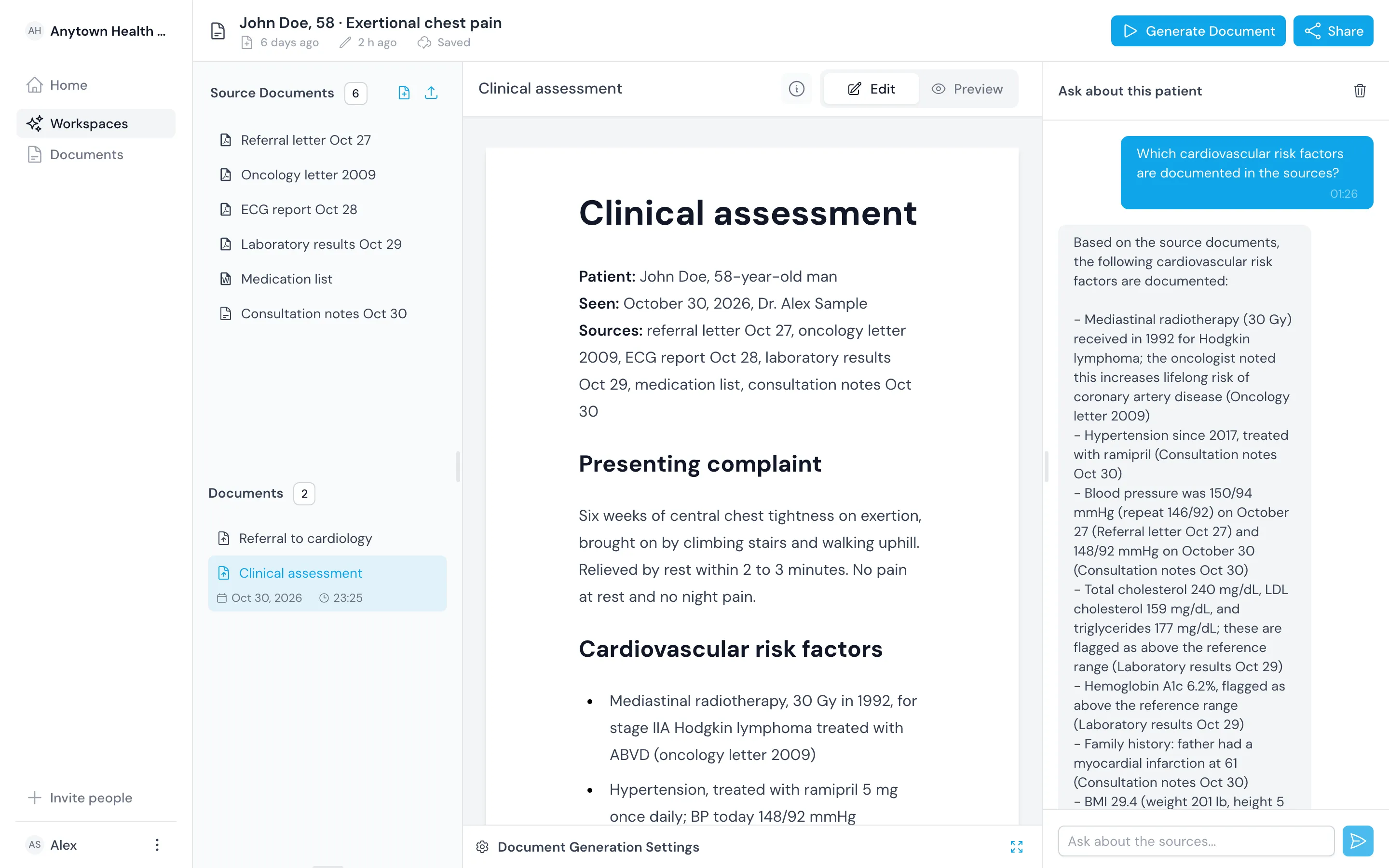
Load the records once and ask the questions that matter now.
Load the whole history
Upload exports from other hospitals, the patient's own records and photographed paper letters.
Ask for what matters now
Ask for allergies, blood thinners, baseline results and limits on treatment.
See the source of each fact
Open the document and date behind every answer before you act on it.
Draft the admission note
Draft the history and assessment from the sources, then edit it.
Draft each handover
Draft the shift handover from the same record, every time.
Share with the next team
Share the workspace with the ICU team or the doctor taking over.
One patient
Get oriented in a 15-year history
Richard Roe, 74, arrives at 2 a.m. breathless and confused, with a 300-page export from three hospitals and a folder of letters from his daughter.
Ask for the facts that change the next decision
Get a penicillin anaphylaxis, apixaban twice daily and a difficult airway from a 2019 anesthesia note, each with its source.
Compare tonight with his baseline
Get his usual creatinine and his last ejection fraction from earlier records, and read tonight's results against them.
Hand the workspace to intensive care
Share it with the ICU team, who ask it their own questions and draft each handover from it.

Questions
Frequently asked questions
Can I use it in an emergency?
Use it to find and check facts faster, next to the original records and your usual systems. It does not diagnose, monitor patients or raise alerts, and you make every decision. The fine print below sets out the limits.
How do the records get in?
Upload what you have: PDFs exported from other hospitals' systems, the patient's own portal download, photographed or scanned paper letters and lab exports. Workup Desk does not connect to record systems yet.
What about very large histories?
Upload every document the patient has. Very large record sets take longer to process, so load them as early as you can.
Workup Desk is not a medical device. No regulator, including the FDA, has cleared or approved it for diagnosis, treatment decisions, triage or time-critical decision support. It answers from the documents you add, and its answers can be incomplete or wrong.
Do not rely on Workup Desk as your only source of information in an emergency. Keep access to the original records and your usual systems. The service can be slow or unavailable, very large record sets take longer to process, and it does not monitor patients or raise alerts.
The clinician remains responsible for every clinical decision. Follow your institution's protocols, and check any fact you act on against its source.
Add identifiable patient data only after your organization has signed a data processing agreement or business associate agreement with us.